
Rust HWID Ban: What an EAC Hardware Ban Looks Like and How to Clear It
A banned account is cheap. A banned machine is not. How to tell which one you have and the sequence that clears a flagged PC.
Rust runs Easy Anti-Cheat, and EAC bans come in two shapes. One is attached to the account. The other is attached to the machine, and it is the one that costs you.
An account ban is a Steam side punishment. You lose the account, the base, the blueprints and the skins. A new account on the same PC works.
A hardware ban is a fingerprint ban. The account is gone and a new account gets banned on the same machine, usually within a raid or two, sometimes before you finish loading in.
The test that tells you which
Buy or make a fresh account, log in on the same machine, and play for an hour.
Survives: account ban, hardware is clean, you are done.
Banned: hardware ban, and no number of new accounts will help.
Do the test before you spend anything. Half the people buying spoofers do not need one.
Why formatting does nothing
A fingerprint is not one value. Disk serials, MAC addresses, GPU identifiers and related hardware IDs get combined into a composite, and the composite is what got flagged.
A Windows install sits on top of that hardware. Formatting replaces the install and leaves every identifier in place, so you come back to a clean desktop, log in, and get banned again.
That is the point where people decide spoofers are a scam. They are not, they just do a job that formatting does not.
What a spoofer does
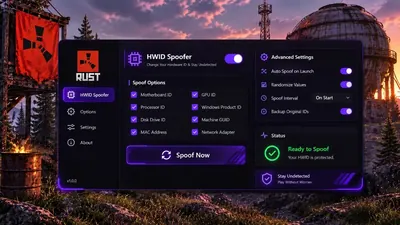
Rewrites those identifiers so the machine reports as something that has not been flagged. Ours covers disk serials, MAC addresses, GPU IDs and related identifiers, and includes a cleaner so leftover traces go before relaunch.
It is built for ban recovery across the major anti-cheats, and Rust with its cleaner is on the supported list under Easy Anti-Cheat.
The order
- Close Rust and Steam completely, including the tray
- Run the cleaner
- Run the spoof
- Reboot
- Confirm the values changed
- Launch Steam and log in on a clean account
Do not spoof with the game open. Do not skip the reboot. Do not log into the banned account first, it proves nothing and burns the attempt.
Requirements
HVCI on, Core Isolation on, TPM on, Secure Boot on, Windows 10 or 11 64-bit, administrator rights for both steps, stable connection for activation.
Cloud DMA is required for full functionality, same as the rest of the stack. If you already run the cheat, that layer is in place.
When a spoofer will not help
Account ban only. Run the test first.
Server ban. A community server ban is not EAC and a spoofer does nothing. That is a Discord appeal.
Manual review ban on a specific account. Hardware is irrelevant to that account.
You play on a laptop with a locked BIOS. Some identifiers cannot be changed on locked firmware and results vary. Ask before buying.
After you are back
The pattern that got you banned is still your pattern. On Rust specifically:
- Do not flyhack across an open field in daylight on a server where you play daily
- Do not run the aimbot while farming
- Do not farm sulfur in the same grid for six hours
- Keep the loader current after each monthly update
One Rust specific note
Force wipe is the first Thursday. It is also when the most reports of bans land, because everyone is online and everyone is blatant in the first hour. If you get hit on a wipe day, do the test before assuming the worst. It is often an account ban from a week earlier that only surfaced when you logged in.
If it is the machine, run the sequence again rather than buying a second tool. Troubleshooting, spoofer product, setup order.